What you can ask maxinja to do
A useful agent brief names the customer, the intended action and the facts that must stay fixed. These examples help you turn a marketing objective into a specific maxinja request, then check the audience, content or journey it builds.
Walkthrough steps
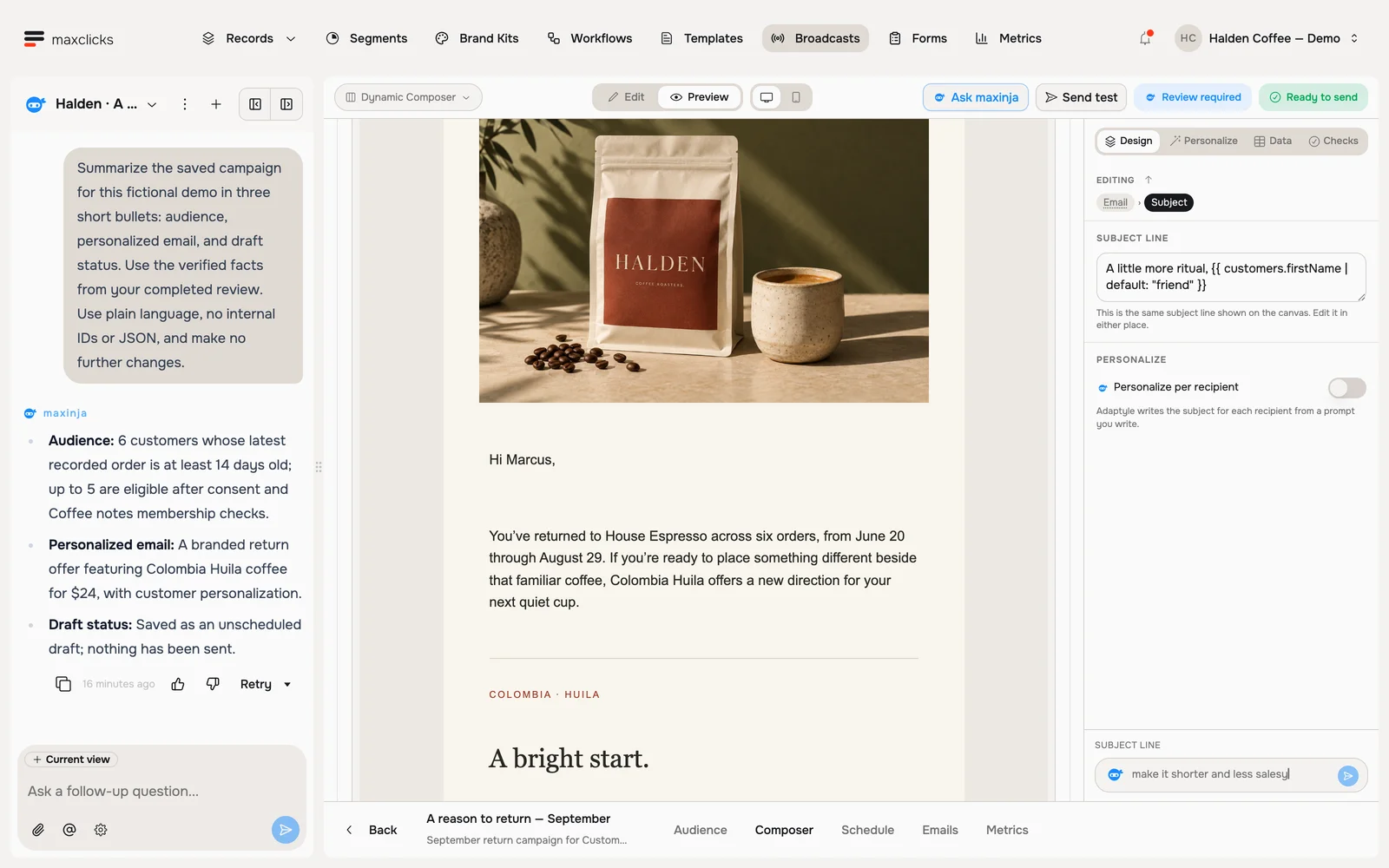
Read maxinja’s completed review of a real Halden campaign draft. Inspect the actual audience count, available draft controls and saved Marcus preview. The agent corrected the audience and sender and left the campaign unscheduled. This is a walkthrough of the completed review, not a recording of live campaign creation; no email is sent.
Ask, review, refine
A useful way to work is to ask, inspect the result and refine it. Name any action you want taken, including scheduling or publishing.
Ask
Open maxinja and type what you want, the way you would ask a teammate. There are no special words.
Review
maxinja does the work and reports back in plain language: the email it wrote, the audience it picked out, the steps it laid down. Inspect the summary and the affected content or settings.
Refine
If something is off, reply with the correction: "make it shorter", "only paying customers". It updates and shows you the new version. Repeat until you are happy.
Prompts to copy
Change the details to match your business.
Write an email
- "Write a friendly welcome email for new subscribers."
- "Draft a broadcast announcing our summer sale, ending Sunday."
- "Rewrite this email to be shorter and warmer."
Build a broadcast audience
- "Set this draft broadcast's audience to customers who bought in the last 30 days but have not clicked an email since. Keep it unscheduled."
- "Target this broadcast at everyone who signed up this month and hasn't placed an order."
Design a workflow
- "Build an unpublished welcome series with three emails over the first week. Show me the trigger, timing and recipient samples."
- "When someone abandons their cart, wait a day, then send a reminder."
Ask about your space
- "How many contacts do I have?"
- "How did my last broadcast perform?"
Try a complete brief: "Create a draft broadcast introducing the supplied product to customers who ordered in the last 30 days. Keep the price and product link fixed and leave it unscheduled." maxinja builds the audience and email; inspect both before choosing when to send.
Point it at something you already have
Type @ in the chat to pull in something from your space, and maxinja works from that instead of guessing: a template, broadcast, workflow, form, webhook, brand kit, record type or segment, plus whatever you happen to have open.
A reference identifies the exact item to change: "Shorten @Welcome email while keeping its offer, sender and links fixed."
Say who and what
The more you name the audience and the goal, the better the result. "Email lapsed customers a 20% off coupon" beats "send an email". You never have to get it right first time though: reply with what to change and maxinja adjusts.
Give the request an execution boundary
Attach the existing campaign or workflow, name the change, and say whether the result should be a draft, scheduled campaign or published journey. For a draft review, a useful request is:
Review this campaign’s audience, offer, sender, customer data and missing-value behavior. Fix the draft and show what is still blocking it. Leave it unscheduled.
Open the saved item after the answer. Check the intended inclusion and exclusion cases, several recipient previews and the campaign or workflow state. A successful draft edit does not establish delivery or a complete workflow run.
You can steer active work with another message. Stop interrupts further work but keeps completed edits and effects. Editing or deleting chat messages does not restore earlier product state; continue with the same saved item. Workspace conversations require write access.
What it costs
AI requests use credits. Usage depends on the model, supplied context and work performed, including any preview or regeneration. Your balance and meters are under Settings, then Billing, on the Overview tab. The itemized breakdown of what went where is on the Usage tab, with access determined by your workspace role and plan.
On the Free plan, credits arrive once, when your first domain is verified, and are never topped up. AI actions need available credits; a separately funded balance can also enable them.
maxinja outside the chat
The chat pane builds three things end to end: templates, broadcasts and workflows. Dedicated generation controls also sit inside the feature being configured: a segment's audience, a computed field, a webhook's condition, a workflow step's logic each have their own small prompt box with a send button, right where you are working. Initial onboarding separately offers assistance with the data model and CSV mapping. In each surface, describe the intended outcome and inspect the result.
Next
Put it to work in Send a broadcast, or let maxinja group your people in Create a segment.